
Free Tools for Tech Entrepreneurs: Build, Grow, and Scale on a Budget
As a tech entrepreneur, you’re constantly balancing big dreams with lean budgets. Every dollar counts, especially in the early stages when you’re bootstrapping, validating ideas, and striving for product-market fit. The good news? You don’t need a massive venture capital infusion to access powerful, enterprise-grade functionality. The digital landscape is overflowing with free tools that can help you build, market, and manage your tech venture without breaking the bank.
I get it. You’ve got an innovative idea, a burning passion, and maybe a small team (or you *are the team). You need to move fast, iterate quickly, and keep your burn rate as low as humanly possible. That’s where free tools become your secret weapon. They democratize access to sophisticated capabilities, allowing you to punch above your weight, test hypotheses, and even launch fully functional products.
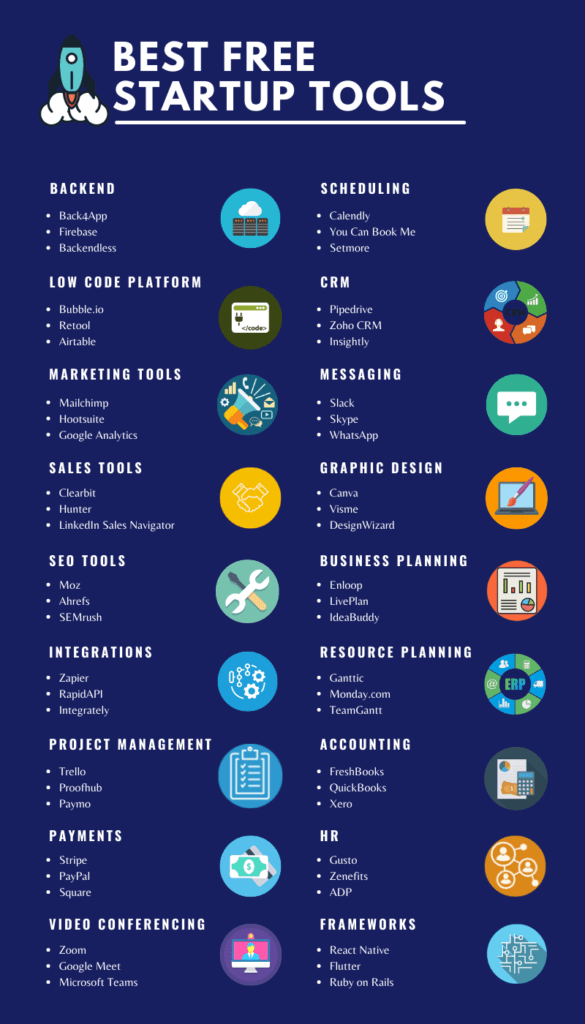
Why Free Tools Are a Tech Entrepreneur’s Secret Weapon
It’s not just about saving money. For tech entrepreneurs, free tools offer a unique advantage that goes beyond cost reduction.
Minimizing Burn Rate Without Sacrificing Innovation
Let’s be real: every cent saved is a cent you can reinvest into product development, user acquisition, or simply extend your runway. Free tools reduce your operational overhead dramatically, allowing you to stretch your limited funds further. This doesn’t mean compromising on quality; many free tiers offer robust features that can rival their paid counterparts for early-stage needs.
Rapid Prototyping and Iteration
The tech world moves at light speed. You need to validate assumptions, build MVPs (Minimum Viable Products), and gather user feedback faster than your competitors. Free design tools, project management platforms, and even AI assistants enable you to conceptualize, mock-up, and iterate on your product with unprecedented agility. You can test ideas, pivot if necessary, and refine your offering without incurring significant development costs for features that might not stick.
Democratizing Access to Enterprise-Grade Functionality
Remember when only large corporations could afford advanced CRM, project management, or marketing automation software? Those days are gone. Free tools have leveled the playing field, offering startups access to powerful features that were once exclusive to big players. This empowers you to build professional products, manage complex projects, and execute sophisticated marketing campaigns right from day one, often with surprisingly rich feature sets.
Phase 1: Ideation & Validation – Turning Ideas into Actionable Concepts
Before you write a single line of code, you need to refine your idea, understand your market, and validate your assumptions. Free tools are invaluable here.
Brainstorming & Mind Mapping Tools
Getting your thoughts out and organized is crucial. These tools are perfect for mapping out user flows, system architecture, or even just brainstorming features with your team.
- Mural: A digital whiteboard that makes visual collaboration easy. Its free tier is great for small teams to brainstorm, create flowcharts, or map out user journeys.
- Miro: Similar to Mural, Miro offers a collaborative online whiteboard with a generous free plan, ideal for mind maps, wireframes, and agile ceremonies.
Market Research & Trend Analysis
Understanding your market and identifying trends doesn’t require expensive reports.
- Google Trends: Explore the popularity of search queries. This is gold for understanding demand, identifying emerging niches, and even validating your product’s keywords.
- Reddit: Often overlooked, Reddit’s communities (subreddits) are a treasure trove of unfiltered user feedback, pain points, and emerging discussions relevant to your niche. Listen to what people are complaining about – that’s your opportunity.
Idea Validation & Feedback
Before you build, ask. Gather feedback quickly and efficiently.
- Google Forms: Create simple surveys and questionnaires to gather quantitative and qualitative feedback from potential users. It’s free, easy to use, and integrates with Google Sheets for data analysis.
- Typeform: Offers a more visually appealing and interactive survey experience with a free tier that allows for limited responses, perfect for early-stage user interviews or feedback forms.
Phase 2: Product Development & Collaboration – Bringing Your Vision to Life
Once your idea is validated, it’s time to build. These tools keep your team organized, your designs crisp, and your communication flowing.
Project Management & Task Tracking
Keeping track of tasks, bugs, and features is non-negotiable. These tools offer robust free tiers to manage your development sprints.
| Tool | Best For | Key Free Features | Free Tier Limitations |
|---|---|---|---|
| Trello | Visual project management, Kanban boards, personal task tracking. | Unlimited cards, up to 10 boards per workspace, power-ups (integrations), basic automation. | Limited file attachments (10MB per file), restricted advanced features/integrations. |
| Asana | Team task management, list-based projects, agile sprints. | Unlimited tasks, projects, messages, and file storage for up to 10 team members, basic reporting. | Limited views (list, board, calendar only), no advanced reporting or custom fields. |
| Notion | All-in-one workspace, notes, databases, project management, wikis. | Unlimited blocks, pages, and databases for individuals, unlimited guests, 1,000 block limit for teams. | Limited file upload size (5MB per file), restricted version history. |
Design & Prototyping
Even if you’re not a designer, you’ll need to create mockups, user interfaces, and marketing assets. These tools make it accessible.
- Figma: The industry standard for UI/UX design and prototyping. Its free tier is incredibly generous, allowing you to create complex designs, collaborate in real-time, and even build interactive prototypes for your product. Essential for any tech founder.
- Canva: For quick marketing materials, social media graphics, presentations, and even simple logos, Canva is a godsend. Its intuitive drag-and-drop interface and vast library of templates mean you can produce professional-looking visuals in minutes.
- Adobe Express: A solid alternative to Canva, offering a robust free plan for creating social media content, flyers, and short videos with access to Adobe Stock photos, fonts, and icons.
Communication & Collaboration Hubs
Effective communication is the backbone of any successful tech team, especially if you’re distributed.
- Google Workspace (formerly G Suite): While a paid service for businesses, many of its core tools like Google Drive (for cloud storage and document sharing), Google Docs, Sheets, and Slides (for collaborative document creation), and Google Meet (for video conferencing) are available for free with a personal Google account. These are indispensable for team collaboration and documentation.
- Slack: The popular team communication platform. Its free tier is perfect for small teams, offering unlimited public channels, 10,000 searchable messages, and 10 integrations.
Phase 3: Marketing & Growth – Attracting Your First Users
A brilliant product is useless if no one knows about it. These free tools help you spread the word and understand your audience.
Email Marketing & CRM Lite
Build your audience and nurture leads from day one.
- Mailchimp: A classic for email marketing. Its free plan allows you to send up to 1,000 emails per month to up to 500 contacts, making it ideal for early-stage newsletters, product updates, and customer outreach.
- Zoho CRM: Offers a free edition for up to three users, providing essential CRM features like lead management, contact management, and account management. Perfect for tracking early customer interactions.
Website & Landing Page Builders
You need an online presence, even if it’s just a landing page to capture interest.
- Wix ADI: Wix Artificial Design Intelligence can build a professional-looking website for you in minutes, based on your answers to a few questions. The free plan offers a Wix subdomain and basic functionality.
- Carrd: For simple, responsive, one-page sites, Carrd is unbeatable. Its free tier lets you publish up to three sites with basic features, ideal for product launch pages or personal portfolios.
- Webflow: While primarily a professional web development tool, Webflow’s free plan allows you to design and prototype up to two projects, giving you a taste of its powerful visual builder.
Analytics & SEO Basics
Understand how users interact with your website and how they find you.
- Google Analytics: Essential for tracking website traffic, user behavior, and conversion goals. It’s free and provides deep insights into your audience and content performance.
- Google Search Console: Monitor your site’s performance in Google Search results, identify indexing issues, and understand which queries drive traffic. Crucial for early SEO efforts.
Phase 4: Operations & Finance – Keeping the Engine Running Smoothly
Even small operations need a handle on finances and legalities.
Financial Tracking & Invoicing (Lite)
Manage your nascent finances without paying for complex software.
- Google Sheets: Incredibly versatile for creating custom budgeting spreadsheets, tracking expenses, generating simple invoices, and managing your cap table in the early days.
- Wave Accounting: Offers completely free accounting, invoicing, and receipt tracking for small businesses. It’s an excellent solution for managing basic financial records without monthly fees.
Legal & Document Management
Handle essential paperwork efficiently.
- Google Docs: For drafting legal documents, terms of service, privacy policies (always consult a lawyer!), and internal company policies. Its collaboration features are a bonus.
- DocuSign Free: For occasional digital signatures, the free tier allows you to sign documents and send a limited number for signature. Handy for early agreements.
The AI Advantage: Game-Changing Free AI Tools for Tech Entrepreneurs
Artificial intelligence isn’t just a buzzword; it’s a productivity superpower. Many AI tools offer robust free tiers that can significantly accelerate your tech venture.
AI for Content Creation & Copywriting
Generate ideas, refine text, and overcome writer’s block.
- ChatGPT (by OpenAI): An unparalleled tool for generating blog post ideas, drafting marketing copy, summarizing complex texts, writing social media updates, and even brainstorming product names. Its free tier provides access to powerful language models.
- Grammarly: Beyond basic spell check, Grammarly’s free version checks for grammar, punctuation, conciseness, and tone, ensuring your professional communications are always polished.
- Quillbot: Great for paraphrasing text, summarizing articles, and checking grammar. Its free version helps you rephrase sentences to sound more professional or clearer, a lifesaver for non-native English speakers or those looking to refine their copy.
AI for Design & Branding
Create visual assets quickly and affordably.
- A.I Icon Generator: Tools like these (many free online versions exist) can quickly generate icons for your app or website based on text prompts. Perfect for placeholders or quick branding elements.
- Canva AI features: Canva integrates AI for features like background remover, magic edit, and text-to-image generation, adding powerful design capabilities even on its free plan.
AI for Productivity & Code Assistance
Streamline workflows and get coding help.
- ChatGPT: Again, ChatGPT shines here for tech entrepreneurs. It can help debug code snippets, explain complex programming concepts, generate boilerplate code, and even write simple scripts in various languages.
- GitHub Copilot (free for verified students/open source maintainers): While not universally free, if you qualify, it’s an incredible AI pair programmer that provides code suggestions in real-time, accelerating development significantly. Look for alternatives with free trials or community editions if you don’t qualify.
- Zapier: While not strictly an AI tool*, its free tier allows you to automate tasks between different apps. You can use it to create simple workflows that integrate with AI tools, e.g., send new Typeform submissions to a Google Sheet and then notify you in Slack.
When Free Becomes Costly: Navigating the Upgrade Path
Free tools are fantastic, but they’re not a panacea. There comes a point in every tech entrepreneur’s journey where relying solely on free options can hinder growth.
Understanding Limitations & Scalability
Free tiers often come with limitations on users, storage, features, or integrations. As your team grows, your user base expands, or your product becomes more complex, these restrictions can become bottlenecks. You might hit data caps, find essential features locked behind a paywall, or struggle with a lack of administrative control.
The Hidden Costs: Time, Data Silos, & Security
Sometimes, the “cost” isn’t monetary. Juggling too many disparate free tools can lead to:
- Increased Time Investment: Manually moving data between tools, finding workarounds for missing features, and managing multiple logins can eat up valuable development time.
- Data Silos: Your customer data might be scattered across various free CRMs, email tools, and spreadsheets, making a unified view impossible.
- Security & Compliance Risks: Free tools might not offer the robust security features, data privacy agreements (like GDPR or HIPAA compliance), or dedicated support that becomes critical as your startup handles more sensitive user data.
Signs It’s Time to Invest
Keep an eye out for these signals:
- Your team is constantly frustrated by limitations or manual workarounds.
- You’re spending more time managing tools than building your product.
- You’re missing critical features for reporting, automation, or security.
- Your growth is being hampered because your tools can’t scale with you.
- You need better integration between your core systems.
Think of free tools as sturdy stepping stones. They get you across the initial river, but eventually, you’ll need a bridge to reach the other side. Plan for the upgrade, treating it as an investment in efficiency and scalability.
Building Your Ultimate Free Tech Stack
The real magic happens when you strategically combine these free tools. Don’t just pick them randomly; think about how they integrate and complement each other.
For example, you could use Notion for your product roadmap, Trello for sprint management, Figma for UI design, Mailchimp for user communication, and ChatGPT to draft all your marketing copy. Integrate Google Analytics to track user engagement and identify areas for improvement. This creates a powerful, interconnected ecosystem without spending a dime.
Your journey as a tech entrepreneur is a marathon, not a sprint. The early days are about ingenuity, resourcefulness, and relentless execution. By leveraging the incredible array of free tools available, you’re not just saving money; you’re empowering yourself to innovate faster, build smarter, and bring your groundbreaking ideas to life. Go forth and build!
Frequently Asked Questions
Is it really possible to build a tech startup using only free tools?
Yes, absolutely! While there will eventually be a need to invest in paid solutions as you scale, many tech entrepreneurs successfully launch and gain initial traction using exclusively free tools for ideation, product development (MVPs), marketing, and basic operations. The key is to be strategic and combine tools effectively.
What are the biggest downsides of relying solely on free tools?
The main downsides include limitations on features, storage, and users; potential data silos if tools don’t integrate well; lack of advanced security or compliance features; and often, less dedicated customer support. As your startup grows, these limitations can hinder scalability and efficiency.
When should a tech entrepreneur consider upgrading from free tools?
You should consider upgrading when free tool limitations impede your team’s productivity, you require advanced features for growth (e.g., deeper analytics, automation), data security and compliance become critical concerns, or the time spent manually managing disparate free tools outweighs the cost of a comprehensive paid solution. Basically, when the ‘free’ starts costing you more in time or lost opportunity.
How can I ensure data security when using multiple free tools?
While free tools may not offer enterprise-level security, you can mitigate risks by using strong, unique passwords with a password manager, enabling two-factor authentication (2FA) wherever available, being mindful of the data you share, and only using reputable tools from established providers. Always review their privacy policies and terms of service.
Are there specific free tools recommended for AI-driven tech startups?
For AI-driven startups, free tools like ChatGPT (for content, code assistance, brainstorming), Grammarly (for communication polish), and free tiers of design tools with AI features (like Canva’s AI photo editing) are invaluable. For more technical needs, explore open-source AI libraries and frameworks that are free to use, or free tiers of specialized AI development platforms.
How do I integrate different free tools effectively?
Start by identifying tools that have native integrations with each other (e.g., Google Workspace tools are highly integrated). For more custom connections, tools like Zapier (which has a free tier for basic automation) can act as a bridge to automate workflows between various free applications, helping to reduce manual effort and data silos.
What’s the best way to discover new free tools relevant to my niche?
Beyond general recommendations, actively participate in tech entrepreneur communities (online forums, Reddit, LinkedIn groups), follow industry blogs and newsletters, and attend virtual startup events. Often, fellow entrepreneurs share their favorite tools. Also, keep an eye on ‘product hunt’ style sites and look for tools offering ‘freemium’ models.